Bulk unpublish and delete catalog products in Product Uploader
Moderate Upgrade
The new Product Uploader experience now supports bulk unpublish and delete operations for catalog products. Catalog managers can remove multiple products from the Production Catalog or permanently delete products from Production and Staging using a CSV-based workflow, instead of performing these actions one product at a time.
Key highlights
-
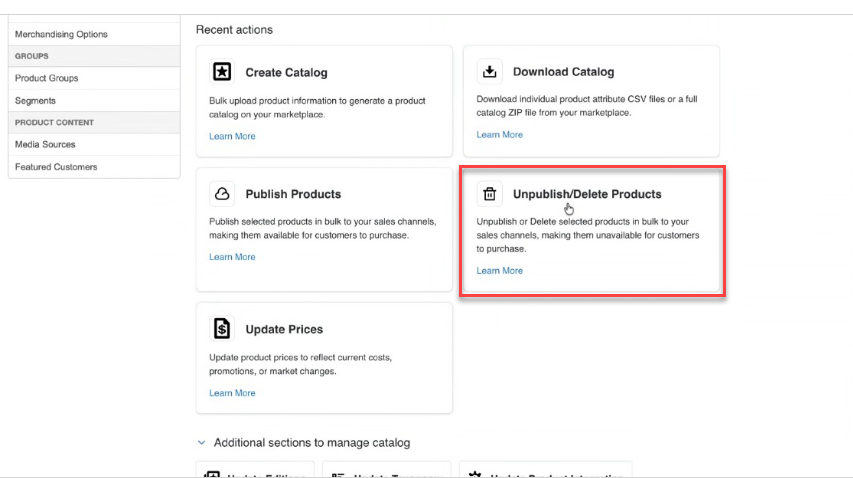
A new Unpublish / Delete Products workflow is available in the new Product Uploader experience.
-
Unpublish removes selected products from the Production Catalog while keeping them in the Staging Catalog with the label Unpublished.
📝 Note: A product that is not in the Production Catalog cannot be unpublished.
-
Delete permanently removes selected products from both the Production and Staging Catalog.
📝 Note: Products with active subscriptions cannot be deleted.
-
Both operations follow the same workflow: download the template, modify the CSV file, and upload it to run the request.
-
The downloaded CSV includes Product Reference ID, Product UID, and Product Name. Keep the rows for the products you want to unpublish or delete and remove the others before uploading.
-
The Activity Log shows Unpublish and Delete requests and lets you download request, success, and failure files to verify results.
UI updates
- Unpublish / Delete Products — New workflow to download a template, update the CSV, and upload the file to unpublish or delete products in bulk.
- Activity Log — Displays Unpublish and Delete process types. Publish and View Catalog options are not shown for these request types.
Feature enablement
This feature is not enabled by default. Contact your AppDirect technical representative to request it.
Setting enablement
No setting enablement is required.
Documentation
Refer to the following:
Was this page helpful?
Tell us more…
Help us improve our content. Responses are anonymous.
Thanks
We appreciate your feedback!